
Key Steps to Policy Analysis
Process of Analyzing Policies
The process of creating policies in ENERGY 2100 begins with describing the policy in detail, defining expectations of policy impacts, translating the policy into model variables, creating an ENERGY 2100 policy file and executing the model, then analyzing and explaining model results to determine whether any adjustments to the policy is required. The steps involved in creating a policy simulation in ENERGY 2100 are summarized in the figure below and described in further detail below.
Steps to Creating a Policy Simulation in ENERGY 2100
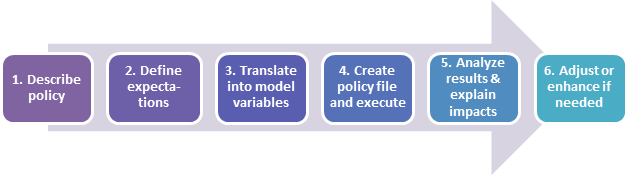
When doing policy analysis in ENERGY 2100, the first step is to describe and define the actual policy in detail (Step 1), including specifics such as the specific industries, geographic areas, fuels, end uses, years, and types of processes which are to be covered by the policy as well as associated costs. Once the policy is clearly defined, the next step is to consider what impacts you expect to see from the policy – both direct impacts and indirect (Step 2). For example, if you are planning a simulation of a residential lighting policy in Alberta, a direct impact you might expect would be a decrease in Alberta’s residential electricity demand for lighting. An indirect impact might be a decrease in electric generation due to decreased lighting demand and potentially a decrease in electricity prices. Identifying these expectations will help determine what to look for in model results and assess the reasonableness of those model results.
After identifying the expected impacts of the policy, you are ready to translate the policy into changes to ENERGY 2100 model variables by creating a policy file then to execute ENERGY 2100 (Steps 3 and 4). Policy files are described further in XXXX.
When reviewing model results (Step 5), determine the impacts of the policy by calculating the difference between results from the policy case and the business-as-usual case. Any impacts that differ from expectations point to areas that require further investigation and explanations in terms of model relationships. Often when reviewing results, you will identify an area which needs further specification or may have been missed during policy definition. Review and enhance the policy definitions or policy file as required and repeat the process until no further modifications are required (Step 6).
To analyze a new policy in ENERGY 2100, follow the steps below:
- Policy Description: Clearly identify the components of a given policy, what structures in the energy system are impacted, and the expected outcomes of the policy.
- Define Expected Outcomes:
- Identify Policy Variables:
- Write or edit a policy file in Julia that changes values of policy variables.
- Compile the policy file to ensure it executes without error. This will change the values of the policy variables.
- Verify that the values of the policy variable have been changed as intended.
There are multiple ways to check the values of the variable after compiling your file, including the following:
- Look at the values on the database through the User Interface
- Add temporary @info statements in the code to write out values to the screen when being compiled
- Advanced - Use VS Code to compile the policy file and view values.
- Execute the model with the changes to the policy variables to see the impact on the overall forecast results.
- Review the results using output tables created during model execution.
- Incorporate the new policy file into larger set of policies, such as the reference case set of policies.
- Execute model the reference case (or other scenario) with the new policy file included.
- Review model results using output tables created during model execution.